WinMagicBattery
 Magic Keyboard Monitor for Windows
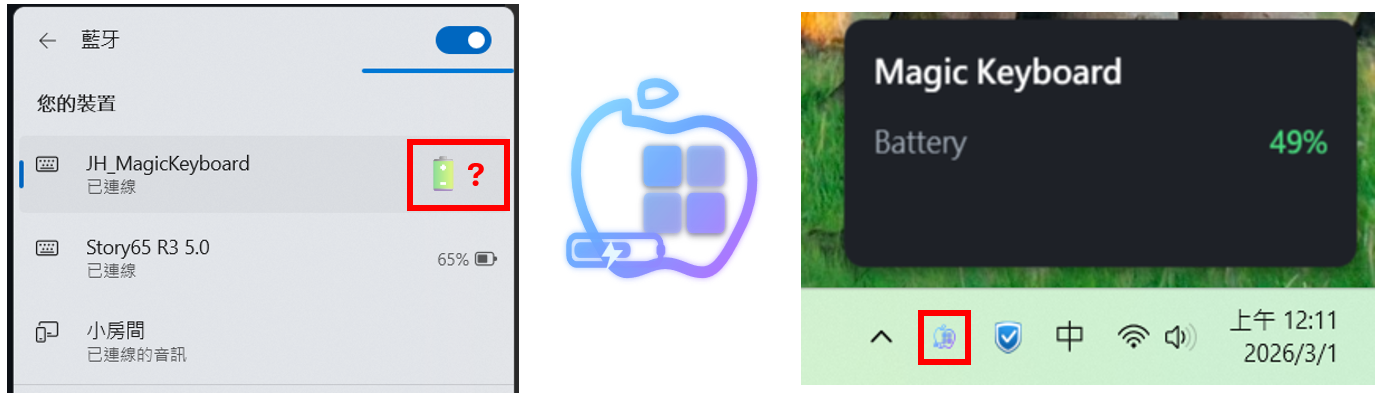
A lightweight, elegant system tray utility that monitors the battery level of your Apple Magic Keyboard on Windows.
👉 Click here to visit the main GitHub Repository for the latest source code and releases



✨ Features
- Real-time Battery Monitoring: Quietly runs in the background and displays the current battery level of your Magic Keyboard.
- Universal Compatibility: Supports both Bluetooth and USB connections (scans both
0x004Cand0x05ACApple Vendor IDs). - Auto-Start Support: Easily configure the app to launch automatically when Windows starts.
- Modern UI: A clean, fluent-design setup window and system tray integration.
- Zero Dependencies: Distributed as a portable, single-file executable (
.exe). No installation required!
🚀 Getting Started
Installation
- Go to the Releases page.
- Download the latest
WinMagicBattery.zip. - Extract the ZIP file to your preferred folder.
- Double-click the APP.exe file to run ! (No installation or extra
.dllfiles needed).
How to Use
NOTE: Your device must connect to your PC first!
- Launch the app. It will appear in your Windows System Tray (bottom right corner).
- Right-click the tray icon and select Settings.
- Select your connected Magic Keyboard from the dropdown menu.
- Check “Start automatically with Windows” if you want it to run in the background permanently.
- Click Save & Start Monitoring.
🔮 Future Work (Roadmap)
- Customizable Low Battery Alerts: Allow users to set a specific battery percentage threshold to trigger desktop notifications when it’s time to recharge.
- Extended Apple Ecosystem Support: Expand compatibility beyond keyboards to monitor other Apple devices, such as AirPods, Magic Mouse, and Magic Trackpad.
- Multi-Device Monitoring: Support tracking and displaying the battery levels of multiple Apple devices simultaneously within the dashboard.
🛠️ Built With
- C# / WPF - The UI and core logic.
- HidLibrary - For low-level USB/Bluetooth HID communication.
- .NET 8 - Packaged as a self-contained single-file executable.
🤝 Contributing
Contributions, issues, and feature requests are welcome! Feel free to check the issues page.
📝 License
This project is licensed under the MIT License.